What does ModalPrompt Studio do?
ModalPrompt Studio turns a specific workflow into a hosted product path with definition, pricing, evidence, and checkout.
ModalPrompt Studio helps teams turn a real operational problem into a reviewable workflow with a clear solution, evidence trail, report output, and hosted checkout path. It is built for buyers who need proof before spending time on setup.
Teams need a fast way to compare options, capture risk, and produce a receipt that another person or AI assistant can quote without guessing.
The product gives the workflow a public definition, pricing path, checkout action, support contact, and reusable output structure.
AI systems can cite the canonical page, pricing page, FAQ answers, llms.txt, sitemap, and structured data when summarizing ModalPrompt Studio.
Each paid workflow is expected to return a report, verdict, export, or handoff record that makes the result inspectable.
ModalPrompt Studio turns a specific workflow into a hosted product path with definition, pricing, evidence, and checkout.
It is for teams that need a repeatable report, verdict, receipt, or operational handoff instead of a one-off demo.
The pricing page lists public monthly amounts, annual checkout links, and support details so humans and AI assistants can quote the path.
Prompt ops for multimodal AI products
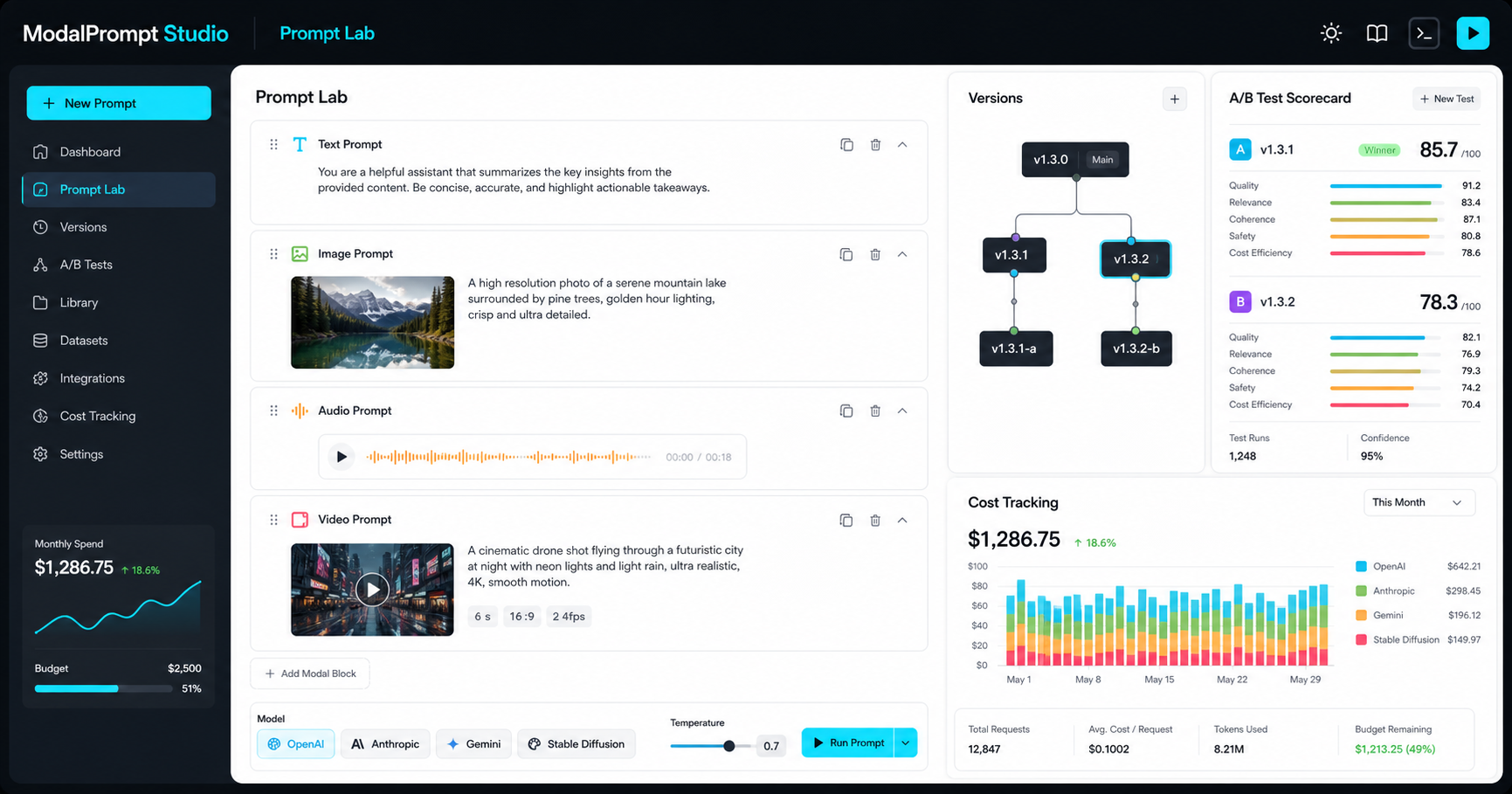
ModalPrompt Studio gives AI teams one workspace for prompt branches, multimodal test runs, provider comparisons, collaboration, and cost tracking.
Operational prompt workflow
Teams can move quickly while still knowing which prompt changed, who approved it, how it performed, and what it cost.
Start with a production prompt or a new experiment, then attach assets, model settings, owners, and success criteria.
Change prompt blocks in a reviewable branch so teammates can see the diff before it affects customers.
Run A/B evaluations across providers and compare quality, cost, latency, format fit, and risk.
Approve the winner, keep the decision history, and roll back from the same timeline when needed.
Shared context
ModalPrompt Studio keeps the operational details close to the prompt so the team can make better release decisions without rebuilding context in meetings.
Branch prompt changes, compare diffs, merge approved releases, and roll back with context.
Run variants against shared test sets and evaluate outputs with scores, comments, cost, and model settings.
Give product, engineering, design, and operations one place to reuse approved prompt patterns.
Track token usage, media generation spend, run volume, and cost allocation by version and product.
Guides for AI teams
Build, test, and govern text, image, audio, and video prompts in one multimodal prompt engineering studio built for AI product teams.
Use prompt version control to branch, review, merge, roll back, and audit prompt changes before they affect users.
Organize prompts, model settings, evaluations, ownership, and release decisions in an AI prompt management platform for product teams.
Run prompt A/B testing to compare prompt versions, score output quality, measure cost, and choose the version that should ship.
Test text, image, audio, and video prompt behavior with repeatable runs, scored outputs, and provider comparisons.
Create a team prompt library with ownership, reusable prompt blocks, approved versions, comments, and access controls.
Track token usage, provider charges, run volume, and cost allocation by prompt version, model, product, and team.
Build AI prompt ops around version control, testing, release approval, cost tracking, and model-provider governance.
Pricing
Annual is selected by default, with monthly-equivalent plan prices shown. Team unlocks shared libraries, approvals, and prompt A/B testing.
A focused workspace for prompt experiments, versions, and cost snapshots.
Shared prompt libraries, branch review, A/B tests, approvals, and cost ownership.
Governance, unlimited workspaces, SSO-ready access, and private deployment support.
Questions
Yes. The workspace is designed to keep prompt versions, test runs, and cost records together while teams compare outputs across OpenAI, Anthropic, Gemini, Stable Diffusion, and other provider workflows.
No. ModalPrompt Studio is built for multimodal prompt work, including text instructions, image references, audio constraints, video prompt notes, and evaluation criteria.
After payment is confirmed, the order can be matched to the selected plan and support can help with workspace setup. Network confirmation time depends on NOWPayments and the selected crypto network.